Sales teams managing active pipelines face a consistent problem: not every deal or lead deserves equal attention, but figuring out which ones matter most requires reviewing data that is often spread across fields, notes, and activity logs. AI scoring inside Salesforce automates this analysis and surfaces a clear, explainable prioritization directly on the record.
The Problem with Manual Pipeline Prioritization
Without AI scoring, sales reps and managers typically rely on a combination of deal stage, gut feel, and whoever showed up loudest in the last pipeline review. This is inefficient for several reasons: it misses patterns in the data that aren't immediately obvious, it is inconsistent across reps, and it doesn't scale as the pipeline grows.
AI scoring applies consistent criteria to every record and produces an output that can be reviewed, questioned, and acted on. The goal is not to replace the sales rep's judgment but to give them a faster starting point backed by structured data.
How AI Lead Scoring Works in Salesforce
When a user clicks Generate AI Score on a Lead, or when automatic scoring runs, AI Engine reads the fields your admin selected for scoring, such as title, company, lead source, industry, number of employees and any custom qualification fields. It adds a short summary of the record's recent tasks and events and, if your admin set it up, examples of your recent won and lost records, then sends everything to your AI model. The model returns a score from 0 to 100, a label (Hot, Warm or Cold by default) and a written reason explaining which factors drove the assessment.
This explanation is important. A score without reasoning doesn't help a rep decide what to do next. A score that says "this lead scores high because the contact is a VP-level decision-maker at a company in your target vertical with recent inbound activity" gives the rep something actionable.
How AI Opportunity Scoring Works in Salesforce
Opportunity scoring follows the same logic but draws on different data points: stage, amount, close date, type, next step and any custom fields your team uses to qualify deals, plus the days left to the close date and the record's recent activity. The AI model evaluates these against your scoring rules and returns a score, a label and a written reason.
For pipeline reviews, this means managers can quickly see which opportunities look at risk, which are well-positioned, and where reps should focus their time in the coming week, without manually reviewing every record.
Scoring That Explains Itself
One of the common criticisms of AI scoring tools is that they produce a number without any transparency into how it was calculated. This makes adoption difficult because reps don't trust scores they can't interrogate.
In AI Engine, every score comes with an analysis of why the record got it, and right after scoring the card also shows a recommendation for what to do next and a confidence badge (high, medium or low). Your admin shapes the scoring on the AI Scoring settings: which fields the AI reads, your own scoring rules and labels, field weights and the language of the written reason. This makes the score useful regardless of whether the rep agrees with it: they can either act on it or push back with specific reasoning.
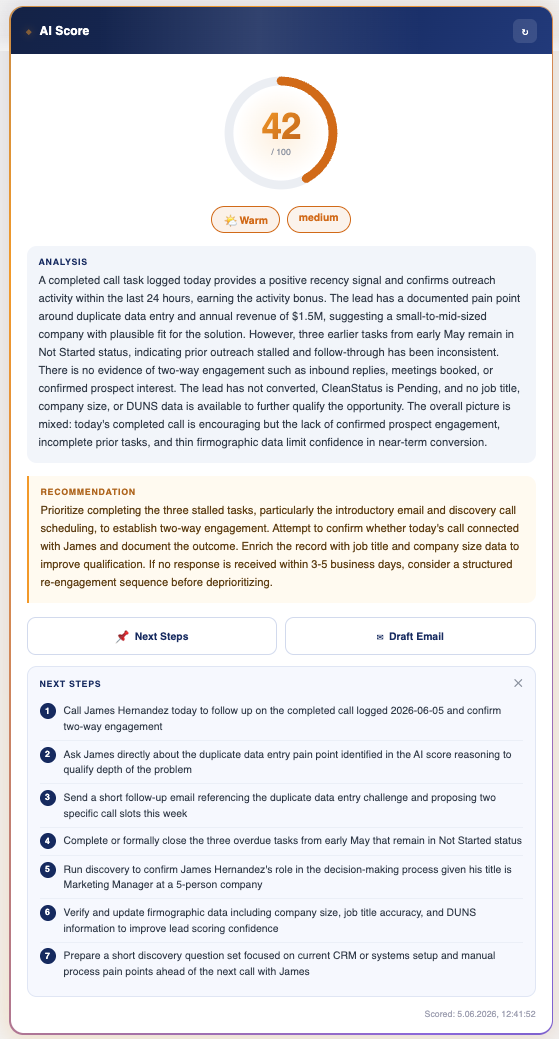
The scoring also looks at the record's real activity history: the subjects, dates and status of its most recent tasks and events, and how many days have passed since the last activity. The AI is instructed to use only the data it is given, to treat an empty field as unknown rather than as a bad sign, and to lower its confidence when key data such as activity history is missing.
From the same card, reps can go one step further without leaving the record: Next Steps shows a short numbered list of recommended actions and Draft Email shows an outreach draft, both inside the card. To create tasks from the steps or to send the email, reps use the same actions in the Sales Agent.
Use Cases for AI Scoring in Sales Teams
Weekly Pipeline Reviews
Instead of manually reviewing every opportunity before a pipeline call, your admin can score open opportunities in bulk, with the Score All … Now button (up to 200 records per click) or a scheduled batch. The score, label and reason are saved in fields on the record, so managers can put them in list views and reports and focus the conversation on the records that need attention: low scores, or reasons that point to missing information or risks.
Lead Prioritization for SDR Teams
SDR teams with high volumes of inbound or outbound leads benefit from consistent scoring that helps them sequence their outreach. Rather than working through a list in the order it was generated, they can prioritize based on fit, activity signals, and data quality. For web-form leads, the optional Verify Company On The Web check runs a web search before scoring to check that the company exists and that its domain and website are genuine.
Forecast Accuracy
When opportunities are scored against the same criteria, deals whose stage looks more optimistic than the data behind them are easier to spot, and the reasons give managers something concrete to question in forecast reviews.
Implementation Inside Salesforce
AI scoring in AI Engine is set up per object on the AI Scoring tab of the admin setup. The admin activates scoring for Leads or Opportunities, picks the fields the AI reads, optionally points it at your won and lost history, and adds scoring rules and field weights. The results are saved in the AI Score, AI Score Label, AI Score Reason and AI Score Date fields and shown on the AI Score card on the record page. Users click Generate AI Score on the card and see the result without leaving the record. Learn more on the AI opportunity scoring page.
No black boxes: AI Engine's scoring settings are configured by your admin team and visible to them. You control which fields the AI reads, what scoring rules and weights it applies, which labels it uses and in which language it writes its reasons. The scoring logic is not hidden inside a proprietary algorithm.
Frequently Asked Questions
Can I customize what the AI scores against?
Yes. Admins choose which fields are sent for scoring, write plain-language scoring instructions (what a good lead looks like, what to exclude, score bands and label names), add field weights such as extra points for a given lead source, and can compare each record with your recent won and lost records. See Set up AI scoring.
Does AI scoring update automatically?
It can. Users can always score a record on demand with Generate AI Score. In addition, an admin can turn on Score New Records Automatically (scores records when they are created), Auto-Refresh (re-scores records when they are updated, optionally only when specific fields change) and scheduled batches that score up to 200 unscored records per run. The automatic options are off until an admin turns them on. Each scored record is one AI request, so it is worth checking usage in the Activity Monitor before switching automatic scoring on for busy objects.
Can scoring results be saved to Salesforce fields?
Yes. The score, label, written reason and scoring date are saved in fields on the Lead or Opportunity, so you can use them in list views, reports and flows. The recommendation and the confidence badge are shown on the AI Score card right after scoring and are not saved.
Which AI models work best for scoring?
AI Engine works with OpenAI, Anthropic Claude and Azure OpenAI, using your own account. At the time of writing the recommended defaults are GPT-4.1 on OpenAI and Claude Sonnet 4.6 on Anthropic. The right choice depends on your existing vendor relationships and data handling requirements.
See AI Engine on your own data
Native Salesforce package. Your own OpenAI, Claude or Azure key. 5-day free trial, no credit card.
Book a 30-min demo